> ## Documentation Index
> Fetch the complete documentation index at: https://imprint-b3c5d5af-partner-docs-latest.mintlify.site/llms.txt
> Use this file to discover all available pages before exploring further.
# Subscribe to event notifications
> Receive and react to real-time event notifications from Imprint
## Overview
You can subscribe to specific event types to receive real-time event notifications. This enables you to build efficient, event-driven workflows and respond promptly to changes in transaction activity, account status, and other critical events.
## How event notifications work
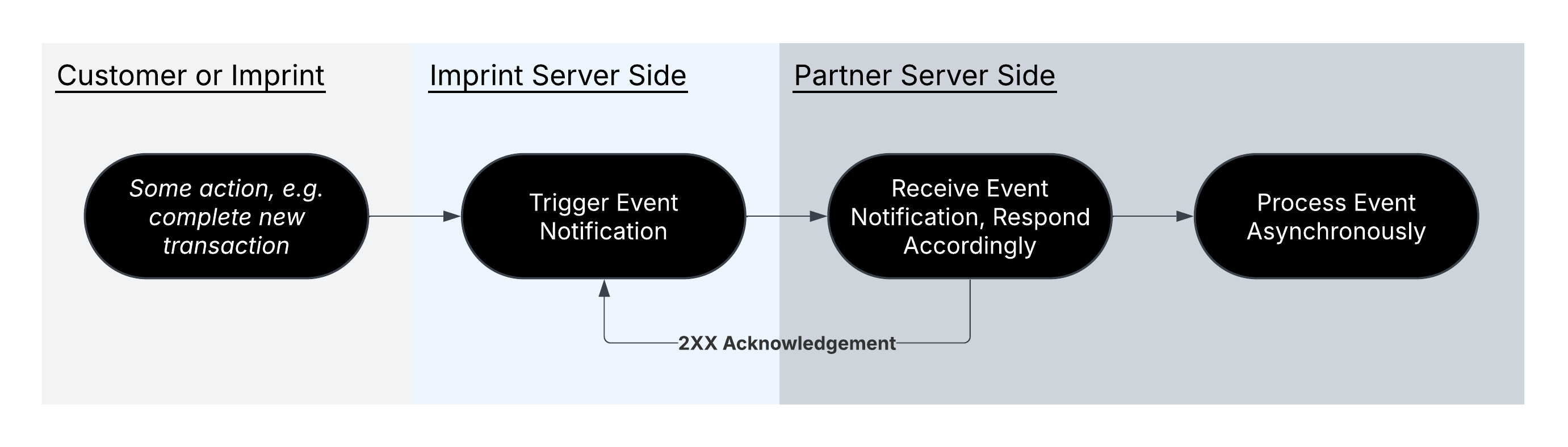
When an event occurs, Imprint will `POST` to the endpoint configured. This event notification contains a JSON payload with details about the event.
As part of event notification enrollment, you will receive a secret shared only between Imprint and you.All requests are signed (HMAC SHA-256) using the shared secret.
For increased security, you can restrict your endpoint to only allow requests from Imprint's IP Ranges, which can be provided by your Imprint team.
Your endpoint should acknowledge events with a `2xx` HTTP response status as soon as it has durably stored the request. Running your business logic immediately on receiving an event is not recommended — do it separately, after you have acknowledged. Imprint treats **every** non-`2xx` response as "not received" and retries with exponential backoff, so a `4xx` does not stop delivery, it only delays it. See [Delivery and retries](/webhook-delivery-and-retries) for the exact schedule and what to return in each situation.
 ## Setup
To start receiving event notifications, please coordinate the following with your Imprint team:
1. **Select events**: subscribe to specific event types. For a description of each event notification, see the [reference pages](https://docs.imprint.co/api-reference/webhooks/application-event-notification).
2. **Register your endpoint(s)**: provide at least one publicly accessible URL where events should be sent. You may provide multiple endpoints, e.g. one per event type. All endpoints must use HTTPS to ensure encrypted communication.
3. **Store event signing token**: your Imprint team will provide the secret key that you will use to validate the signature of incoming requests. Please see the [signature verification page](/verify-event-notification) for more detail on how to interpret the `X-IMPRINT-HMAC-SIGNATURE` header.
4. **Retry logic**: implement idempotency handling to avoid processing duplicate events, as Imprint will retry failed webhook deliveries. Events are delivered independently and in parallel, so also make your processing order-independent — see [Delivery and retries](/webhook-delivery-and-retries).
## Handle duplicate events
You may receive duplicate event notifications occasionally due to network issues or retry logic. To ensure your system processes each event only once, implement idempotency handling by tracking which events have already been processed.
You can uniquely identify events using a combination of:
* **`object`** (e.g., `TRANSACTION`, `APPLICATION`)
* **`id`** (e.g., `transaction_id`, `event_id`, `payment_method_id`)
* **`updated_at` timestamp** in the event data payload
We recommend storing these identifiers when processing an event and checking against them before processing subsequent events. If you receive an event with matching identifiers, you can safely ignore it as a duplicate.
## Examples
### Transaction notifications
Below, we have provided more detail regarding the possible transaction statuses and expected transaction scenarios.
#### Transaction statuses
| Status | Description |
| - | - |
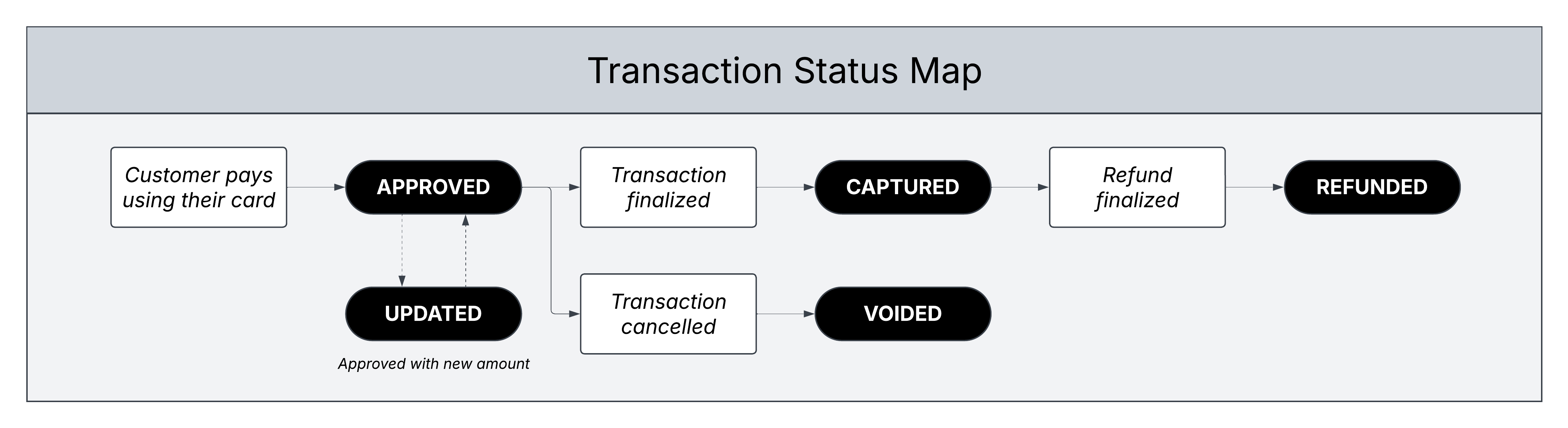
| `APPROVED` | Authorization request was received from the merchant and approved by Imprint, which creates a pending transaction on the customer's statement. |
| `UPDATED` | Authorization request was updated by the merchant, which updates the pending transaction on the customer's statement. |
| `VOIDED` | Approved authorization has been cancelled by the merchant or expired by Imprint, which removes the pending transaction from the customer's statement. |
| `CAPTURED` | Approved authorization has been captured, or a force capture has been created (e.g., bypassing the authorization step), which creates a confirmed transaction on the customer's statement with the final purchase amount. |
| `REFUNDED` | Refund has been created by the merchant, either related to a previous capture or standalone (e.g., "blind return"), which creates a confirmed transaction on the customer's statement with the final refund amount. |
## Setup
To start receiving event notifications, please coordinate the following with your Imprint team:
1. **Select events**: subscribe to specific event types. For a description of each event notification, see the [reference pages](https://docs.imprint.co/api-reference/webhooks/application-event-notification).
2. **Register your endpoint(s)**: provide at least one publicly accessible URL where events should be sent. You may provide multiple endpoints, e.g. one per event type. All endpoints must use HTTPS to ensure encrypted communication.
3. **Store event signing token**: your Imprint team will provide the secret key that you will use to validate the signature of incoming requests. Please see the [signature verification page](/verify-event-notification) for more detail on how to interpret the `X-IMPRINT-HMAC-SIGNATURE` header.
4. **Retry logic**: implement idempotency handling to avoid processing duplicate events, as Imprint will retry failed webhook deliveries. Events are delivered independently and in parallel, so also make your processing order-independent — see [Delivery and retries](/webhook-delivery-and-retries).
## Handle duplicate events
You may receive duplicate event notifications occasionally due to network issues or retry logic. To ensure your system processes each event only once, implement idempotency handling by tracking which events have already been processed.
You can uniquely identify events using a combination of:
* **`object`** (e.g., `TRANSACTION`, `APPLICATION`)
* **`id`** (e.g., `transaction_id`, `event_id`, `payment_method_id`)
* **`updated_at` timestamp** in the event data payload
We recommend storing these identifiers when processing an event and checking against them before processing subsequent events. If you receive an event with matching identifiers, you can safely ignore it as a duplicate.
## Examples
### Transaction notifications
Below, we have provided more detail regarding the possible transaction statuses and expected transaction scenarios.
#### Transaction statuses
| Status | Description |
| - | - |
| `APPROVED` | Authorization request was received from the merchant and approved by Imprint, which creates a pending transaction on the customer's statement. |
| `UPDATED` | Authorization request was updated by the merchant, which updates the pending transaction on the customer's statement. |
| `VOIDED` | Approved authorization has been cancelled by the merchant or expired by Imprint, which removes the pending transaction from the customer's statement. |
| `CAPTURED` | Approved authorization has been captured, or a force capture has been created (e.g., bypassing the authorization step), which creates a confirmed transaction on the customer's statement with the final purchase amount. |
| `REFUNDED` | Refund has been created by the merchant, either related to a previous capture or standalone (e.g., "blind return"), which creates a confirmed transaction on the customer's statement with the final refund amount. |
 Use `transaction_id` to track a transaction throughout the lifecycle of different statuses and `event_id` to identify each step uniquely
#### Common transaction scenarios
As soon as the customer pays with their card, you will receive an `APPROVED` event. However, it may take several hours for the merchant to finalize the transaction through the card network. Once a transaction is finalized, you will receive a `CAPTURED` event with the confirmed purchase amount.
| Event ID | Transaction ID | Amount | Status |
| - | - | - | - |
| 123 | 123 | \$50 | `APPROVED` |
| 234 | 123 | \$50 | `CAPTURED` |
In some cases, merchants may bypass the `APPROVED` step (e.g., force capture) or capture for more/less than the `APPROVED` amount. Regardless, `CAPTURED` always represents a confirmed purchase amount.
It's possible for a merchant to capture a single transaction multiple times (e.g., single order split into multiple shipments). When this happens, you will receive multiple `CAPTURED` events with the `amount` encompassing each individual charge.
| Event ID | Transaction ID | Amount | Status | ... |
| - | - | - | - | - |
| 123 | 123 | \$50 | `APPROVED` | ... |
| 234 | 123 | \$20 | `CAPTURED` | ... |
| 345 | 123 | \$30 | `CAPTURED` | ... |
It's possible for merchants to authorize one amount initially and later request an updated authorization amount that is higher/lower. For example, automated fuel dispensers which authorize for \~\$100 immediately and then update the authorization to the final purchase amount after the customer has finished pumping.
| Event ID | Transaction ID | Amount | Status | ... |
| - | - | - | - | :- |
| 123 | 123 | \$100 | `APPROVED` | ... |
| 234 | 123 | \$50 | `UPDATED` | ... |
| ... | ... | ... | ... | ... |
If a merchant reverses an `APPROVED` authorization or lets the authorization expire (e.g., after nine days without capture), you will receive a `VOIDED` event.
| Event ID | Transaction ID | Amount | Status | ... |
| - | - | - | - | - |
| 123 | 123 | \$50 | `APPROVED` | ... |
| 234 | 123 | \$50 | `VOIDED` | ... |
There can be multiple refunds associated with a transaction and you will receive a `REFUNDED` event for each. In most cases, refunds are linked to an existing transaction (e.g., example below), but standalone refunds are possible as well.
| Event ID | Transaction ID | Amount | Status | ... |
| - | - | - | - | :- |
| 123 | 123 | \$50 | `APPROVED` | ... |
| 234 | 123 | \$50 | `CAPTURED` | ... |
| 345 | 123 | \$30 | `REFUNDED` | ... |
If the `CAPTURED` transaction is disputed and won by the customer (e.g., example below), it translates to a new refund. If the dispute is lost, no change - it's still a purchase on the customer's statement.
| Event ID | Transaction ID | Amount | Status | ... |
| - | - | - | - | :- |
| 123 | 123 | \$50 | `APPROVED` | ... |
| 234 | 123 | \$50 | `CAPTURED` | ... |
| 345 | 123 | \$50 | `REFUNDED` | ... |
### Retrieve a transaction's events
Every row in the scenario tables above is a transaction **event**: the authorization, each capture, each refund, and a confirmed dispute. Event notifications deliver them one at a time as they happen. If you did not store those notifications, or want to reconcile a transaction after the fact, you can ask the API for the same events with the `expand=events` query parameter on either transaction endpoint:
* [Retrieve a transaction](/api-reference/transactions/retrieve-a-transaction): `GET /v2/transactions/{transaction_id}?expand=events`
* [List customer's transactions](/api-reference/customers/list-customers-transactions): `GET /v2/customers/{customer_id}/transactions?expand=events`
```bash theme={null}
curl "https://api.imprint.co/v2/transactions/4E6FE207-53E5-4EC0-BF51-5923BE5CEE2F?expand=events" \
-H "Authorization: Bearer $IMPRINT_API_KEY"
```
The transaction is returned exactly as it is without `expand`, plus an `events` array ordered oldest first. Each event carries:
| Field | Description |
| - | - |
| `event_id` | The same `event_id` delivered in the Transaction Event Notification for that step, and the `transaction_event_id` carried by a [Reward](/api-reference/rewards/search-for-rewards) earned or deducted by it. |
| `status` | The step's status: `APPROVED`, `VOIDED`, `CAPTURED` or `REFUNDED`. |
| `amount` | The amount of that step in minor units, always positive. |
| `created_at` | When the step happened, as an RFC-3339 timestamp. |
For the first scenario above (a \$50 purchase that was later captured), the response looks like this:
```json theme={null}
{
"id": "4E6FE207-53E5-4EC0-BF51-5923BE5CEE2F",
"customer_id": "9B5E1EE0-2E1C-46E7-81B9-3C3917204BE4",
"amount": 5000,
"currency": "USD",
"status": "CAPTURED",
"created_at": "2026-10-01T18:00:00Z",
"updated_at": "2026-10-03T04:00:00Z",
"events": [
{
"event_id": "4E6FE207-53E5-4EC0-BF51-5923BE5CEE2F",
"status": "APPROVED",
"amount": 5000,
"created_at": "2026-10-01T18:00:00Z"
},
{
"event_id": "B2D4A1C9-7F3E-4C8A-9E61-2A5B8D0F4C17",
"status": "CAPTURED",
"amount": 5000,
"created_at": "2026-10-03T04:00:00Z"
}
]
}
```
Use `event_id` to look up the reward for a specific step with [Search for rewards](/api-reference/rewards/search-for-rewards) (`GET /v2/rewards?transaction_event_id=...`).
Two differences from the notifications you receive:
* An `UPDATED` authorization is not a separate event. The authorization is a single `APPROVED` event whose `amount` is the latest authorized amount.
* A dispute appears as a `REFUNDED` event only once it has been confirmed in the customer's favour. Pending disputes and disputes the customer lost are not listed.
`expand` accepts a comma-separated list. `events` is the only value supported today; any other value returns `400 Bad Request`. Omit `expand` to receive the transaction without events, which is the cheapest form of the request.
This documentation is built and hosted on [Mintlify](https://mintlify.com), a developer documentation platform.
Use `transaction_id` to track a transaction throughout the lifecycle of different statuses and `event_id` to identify each step uniquely
#### Common transaction scenarios
As soon as the customer pays with their card, you will receive an `APPROVED` event. However, it may take several hours for the merchant to finalize the transaction through the card network. Once a transaction is finalized, you will receive a `CAPTURED` event with the confirmed purchase amount.
| Event ID | Transaction ID | Amount | Status |
| - | - | - | - |
| 123 | 123 | \$50 | `APPROVED` |
| 234 | 123 | \$50 | `CAPTURED` |
In some cases, merchants may bypass the `APPROVED` step (e.g., force capture) or capture for more/less than the `APPROVED` amount. Regardless, `CAPTURED` always represents a confirmed purchase amount.
It's possible for a merchant to capture a single transaction multiple times (e.g., single order split into multiple shipments). When this happens, you will receive multiple `CAPTURED` events with the `amount` encompassing each individual charge.
| Event ID | Transaction ID | Amount | Status | ... |
| - | - | - | - | - |
| 123 | 123 | \$50 | `APPROVED` | ... |
| 234 | 123 | \$20 | `CAPTURED` | ... |
| 345 | 123 | \$30 | `CAPTURED` | ... |
It's possible for merchants to authorize one amount initially and later request an updated authorization amount that is higher/lower. For example, automated fuel dispensers which authorize for \~\$100 immediately and then update the authorization to the final purchase amount after the customer has finished pumping.
| Event ID | Transaction ID | Amount | Status | ... |
| - | - | - | - | :- |
| 123 | 123 | \$100 | `APPROVED` | ... |
| 234 | 123 | \$50 | `UPDATED` | ... |
| ... | ... | ... | ... | ... |
If a merchant reverses an `APPROVED` authorization or lets the authorization expire (e.g., after nine days without capture), you will receive a `VOIDED` event.
| Event ID | Transaction ID | Amount | Status | ... |
| - | - | - | - | - |
| 123 | 123 | \$50 | `APPROVED` | ... |
| 234 | 123 | \$50 | `VOIDED` | ... |
There can be multiple refunds associated with a transaction and you will receive a `REFUNDED` event for each. In most cases, refunds are linked to an existing transaction (e.g., example below), but standalone refunds are possible as well.
| Event ID | Transaction ID | Amount | Status | ... |
| - | - | - | - | :- |
| 123 | 123 | \$50 | `APPROVED` | ... |
| 234 | 123 | \$50 | `CAPTURED` | ... |
| 345 | 123 | \$30 | `REFUNDED` | ... |
If the `CAPTURED` transaction is disputed and won by the customer (e.g., example below), it translates to a new refund. If the dispute is lost, no change - it's still a purchase on the customer's statement.
| Event ID | Transaction ID | Amount | Status | ... |
| - | - | - | - | :- |
| 123 | 123 | \$50 | `APPROVED` | ... |
| 234 | 123 | \$50 | `CAPTURED` | ... |
| 345 | 123 | \$50 | `REFUNDED` | ... |
### Retrieve a transaction's events
Every row in the scenario tables above is a transaction **event**: the authorization, each capture, each refund, and a confirmed dispute. Event notifications deliver them one at a time as they happen. If you did not store those notifications, or want to reconcile a transaction after the fact, you can ask the API for the same events with the `expand=events` query parameter on either transaction endpoint:
* [Retrieve a transaction](/api-reference/transactions/retrieve-a-transaction): `GET /v2/transactions/{transaction_id}?expand=events`
* [List customer's transactions](/api-reference/customers/list-customers-transactions): `GET /v2/customers/{customer_id}/transactions?expand=events`
```bash theme={null}
curl "https://api.imprint.co/v2/transactions/4E6FE207-53E5-4EC0-BF51-5923BE5CEE2F?expand=events" \
-H "Authorization: Bearer $IMPRINT_API_KEY"
```
The transaction is returned exactly as it is without `expand`, plus an `events` array ordered oldest first. Each event carries:
| Field | Description |
| - | - |
| `event_id` | The same `event_id` delivered in the Transaction Event Notification for that step, and the `transaction_event_id` carried by a [Reward](/api-reference/rewards/search-for-rewards) earned or deducted by it. |
| `status` | The step's status: `APPROVED`, `VOIDED`, `CAPTURED` or `REFUNDED`. |
| `amount` | The amount of that step in minor units, always positive. |
| `created_at` | When the step happened, as an RFC-3339 timestamp. |
For the first scenario above (a \$50 purchase that was later captured), the response looks like this:
```json theme={null}
{
"id": "4E6FE207-53E5-4EC0-BF51-5923BE5CEE2F",
"customer_id": "9B5E1EE0-2E1C-46E7-81B9-3C3917204BE4",
"amount": 5000,
"currency": "USD",
"status": "CAPTURED",
"created_at": "2026-10-01T18:00:00Z",
"updated_at": "2026-10-03T04:00:00Z",
"events": [
{
"event_id": "4E6FE207-53E5-4EC0-BF51-5923BE5CEE2F",
"status": "APPROVED",
"amount": 5000,
"created_at": "2026-10-01T18:00:00Z"
},
{
"event_id": "B2D4A1C9-7F3E-4C8A-9E61-2A5B8D0F4C17",
"status": "CAPTURED",
"amount": 5000,
"created_at": "2026-10-03T04:00:00Z"
}
]
}
```
Use `event_id` to look up the reward for a specific step with [Search for rewards](/api-reference/rewards/search-for-rewards) (`GET /v2/rewards?transaction_event_id=...`).
Two differences from the notifications you receive:
* An `UPDATED` authorization is not a separate event. The authorization is a single `APPROVED` event whose `amount` is the latest authorized amount.
* A dispute appears as a `REFUNDED` event only once it has been confirmed in the customer's favour. Pending disputes and disputes the customer lost are not listed.
`expand` accepts a comma-separated list. `events` is the only value supported today; any other value returns `400 Bad Request`. Omit `expand` to receive the transaction without events, which is the cheapest form of the request.
This documentation is built and hosted on [Mintlify](https://mintlify.com), a developer documentation platform.